How to configure wifi access on Android
The easiest way to configure access to the University’s wifi network is to use the Eduroam automatic configuration service.
To manually configure the connection, here are the steps to follow.
Detailed Guide
Description of available WIFI networks:
- Eduroam: Secure connection that allows you to connect to other institutions affiliated with this project without needing to make changes to your device’s configuration. This network is especially useful for connecting to other universities or institutions in the program.
- Iumhnet: Secure connection with coverage exclusively on the UMH Wifi network.
- Iumhweb: Open connection (without security) to be used by those who do not have a domain username/password or student DNI/Pin and are visiting UMH. Using Iumhweb, you will need to repeat the validation process each time you connect.
Selecting the wifi network: Go to the device settings, “Settings” menu, then enter the “Network & Internet” menu and then “Wi-Fi”, and on the network you want to connect to, press the symbol on the right to access the options as shown in the figure: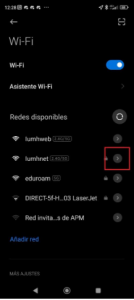
Accessing and configuring advanced options: Select the network you want to connect to again and access “Advanced Options”.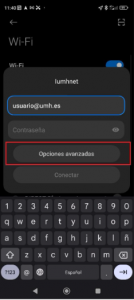
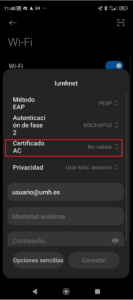
Configuring the connection: Now mark the following options, as indicated in the attached image:
- EAP Method: PEAP
- Phase 2 Authentication: MSCHAPV2
- CA Certificate: Do not validate or Trust on first use
- Anonymous Identity: Leave blank
Note: For Pixel phones - EAP Method : PEAP
- Phase 2 Authentication: MSCHAPV2
- CA Certificate: Use system certificate
- Anonymous Identity: Leave Blank
- Domain: umhnet.es
Which user should I use to configure the connection?
- Students: In the “Identity” or “Username” field, type your DNI number without the letter, followed by “@umh.es” (example: ) and the “Password” is your Pin.
- UMH Staff: In the “Identity” or “Username” field, type your full UMH email address (example: ) and the “Password” is your domain login password.
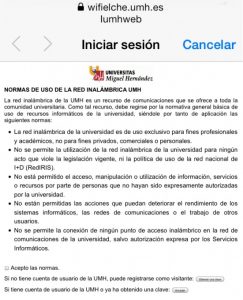
- Visitors: Visitors can also connect to the UMH Wifi network by registering with a form. Just select the Iumhweb network and open a browser to automatically access the registration form.
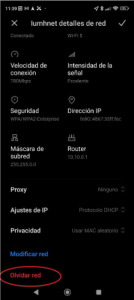
| Note: Reconfiguring the wifi network.
If your device already has the wifi network configured and you are experiencing connection problems, you can try to delete the wifi network and reconnect it. To do this, go to the network options and select “Forget network“: |