How to renew the Trend Micro Titanium Internet Security (WINDOWS) license
26 March 2026
In this article, we will see how to renew the license for this antivirus.
Detailed Guide
- Show hidden icons:
- On the right side of the Windows taskbar, click as shown by the mouse pointer in the image to show hidden icons.

- On the right side of the Windows taskbar, click as shown by the mouse pointer in the image to show hidden icons.
- Access the antivirus menu:
- Right-click on the Trend Micro antivirus icon.

- The following menu will appear; click on Check subscription.
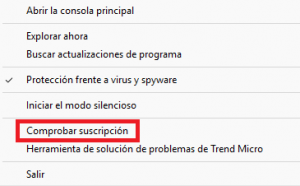
- Right-click on the Trend Micro antivirus icon.
- Subscription information:
- It shows the following information, where you can see your subscription serial number and the expiration date in the bottom left corner.
- To renew it, you must provide a new serial number.
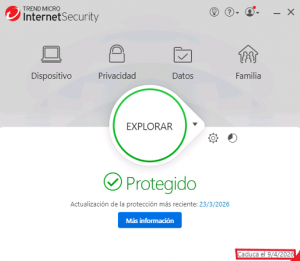
- Obtain a new serial number:
- To get a new serial number, go to universite.umh.es and click on Applications.

- In applications, search for Software Download and click on Software Download.

- Click on the antivirus version according to your operating system, choosing the version for Trend Micro Titanium Internet Security (WINDOWS).

- To get a new serial number, go to universite.umh.es and click on Applications.
- Accept conditions and download:
- You must accept the conditions and click on the appropriate version of the Operating System (Win 32 or Win 64). You can check your operating system version in Control Panel -> System and Security -> System.
- In this example, we use Win 64.
- The next screen displays the program license code. (You must copy this code). You will also receive an email with the conditions associated with this download.

- Provide the new serial number:
- Once you have the serial number, return to the Subscription Information screen. Verify that the serial number is different from the one currently shown. If so, click on Provide a serial number.
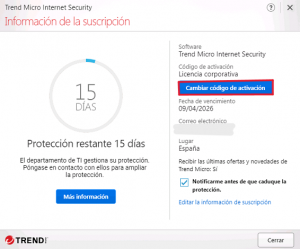
- Enter your serial number and click Next.
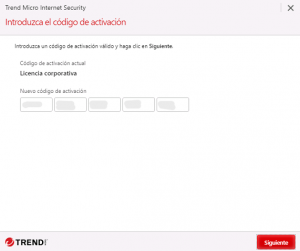
- Once you have the serial number, return to the Subscription Information screen. Verify that the serial number is different from the one currently shown. If so, click on Provide a serial number.
-
- Enter your corporate email
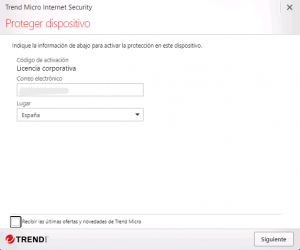
- After entering the new serial number and corporate email, the new expiration date should be displayed.
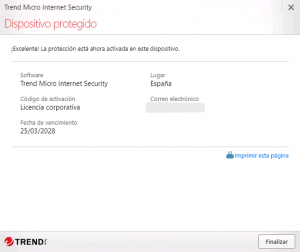
- Enter your corporate email
Congratulations, you have renewed your antivirus license.