How to recover a previous version of a deleted document from a shared drive on macOS
The integration of macOS with previous versions of shared drives is not as straightforward as in Windows, but it is also possible to recover files from these copies. The screenshots in this article are from macOS Sierra, but the procedure is similar for other versions.
Detailed guide
- Access the network drive from Finder. Once in the network drive, press ⌘ + Shift + . (period). This combination will show hidden folders, including the one called ~snapshot.

- Inside the ~snapshot folder are the previous versions of the shared drive.
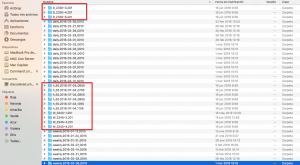
- The folders containing the previous versions are the ones that start with H, D, and W.
- H for those made every hour.
- D for those made once a day.
- W for those made once a week.
- By searching in the type of folder, depending on the time since the file was changed or deleted, we can copy it from the ~snapshot folder to the desired location.
- To finish, we will hide the ~snapshot directory again by pressing ⌘ + Shift + . (period).