How to request user registration in the UMHNET directory
For staff hired by Miguel Hernández University (UMH), the institutional domain account is automatically created when their employment relationship is formalized. In contrast, for collaborating personnel, this service can be requested whenever a domain user account is needed to carry out tasks at UMH.
Steps to submit the request
- Access the CAU portal
Go to: https://cau.umh.es - Create a new ticket
Click on the “New ticket” option.

- Select the appropriate unit
In the ticket creation form, select:- Unit: User Support Center
- Category: ICT Requests
- Subcategory: User Account Request/Renewal
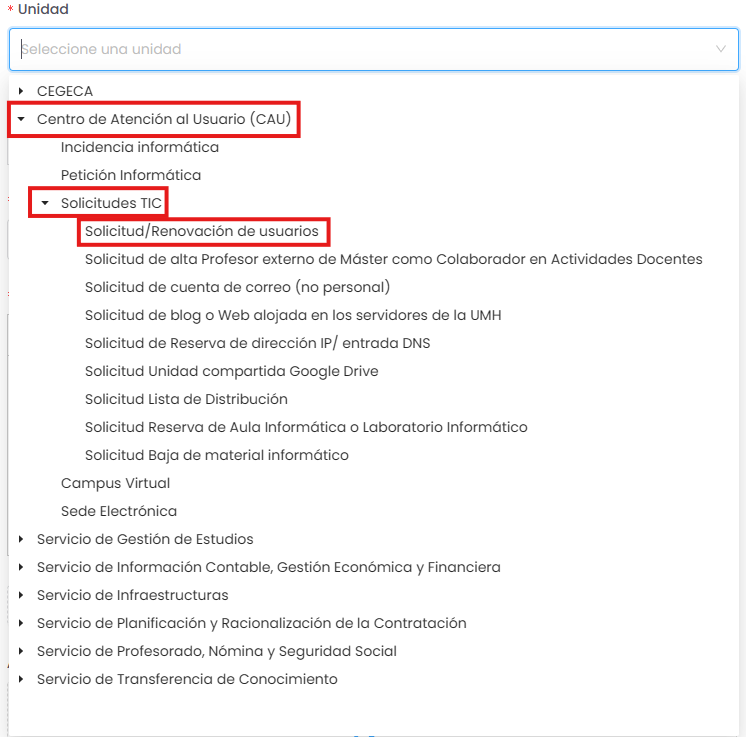
- Fill out the request form
Provide:- User’s personal details
- Requested role
- Start and end dates

- Submit the request
Click “Submit” to complete the process.
What happens next?
Once the request is submitted:
- The CAU team will review and process your request.
- You will receive an email notification once the new role has been assigned to the user or if additional information is required.