How to request a loan of IT equipment
The IT Infrastructure Service at Miguel Hernández University (UMH) offers desktop computers, laptops, and printers for temporary loan to university staff in situations such as:
- Institutional events
- Presentations
- Temporary replacement during repairs
- Other specific needs
Steps to submit a loan request
1. Access the CAU portal
Go to: https://cau.umh.es
2. Create a new ticket
Click on the “New ticket” option.

3. Select the appropriate unit
In the ticket creation form, choose:
- Unit: User Support Center
- Category: IT Request
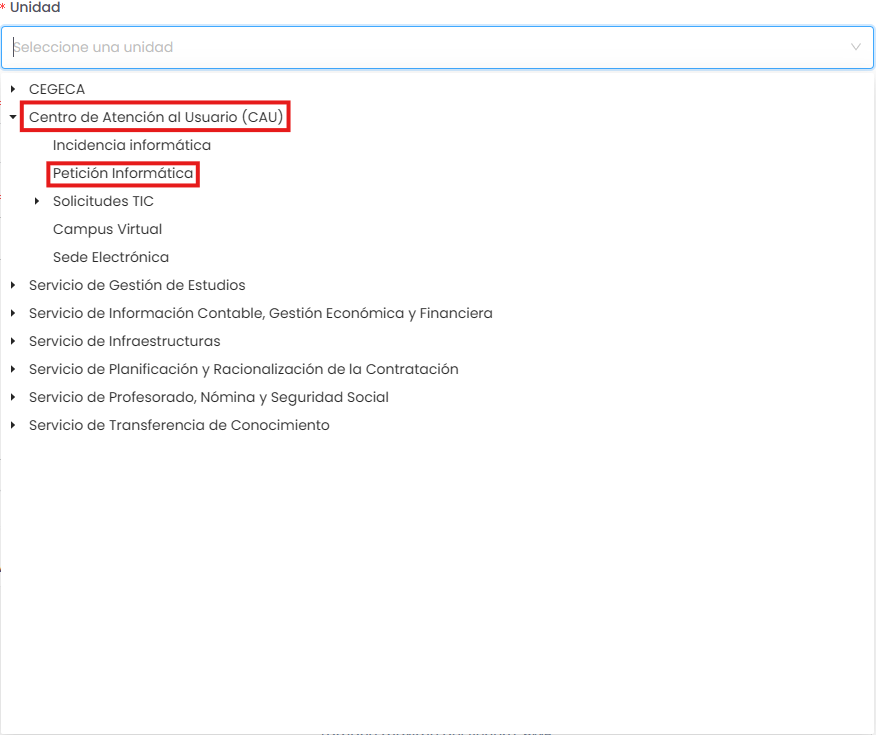
4. Fill out the request
In the IT request section, provide the following information:
- What equipment is needed
- Reason for the request
- Location where the equipment will be used
- Start and end dates of the loan
5. Submit the request
Once the form is completed, click “Save”.