How to Safely Erase Devices with Windows
Windows 11 provides users with a very simple tool to delete all information from a computer and restore the operating system, in case the user no longer wants to use it. During the process, a secure method of deleting information is also offered, so our machine can be reused by a third party without risking our privacy.
Detailed Guide
To restore Windows 11 to factory settings and securely delete all our data, follow these steps:
- Locate the “Magnifying Glass” icon on your system’s taskbar and type “recovery options“.

- Next, click on the suggested option.

- Select “Reset this PC“.
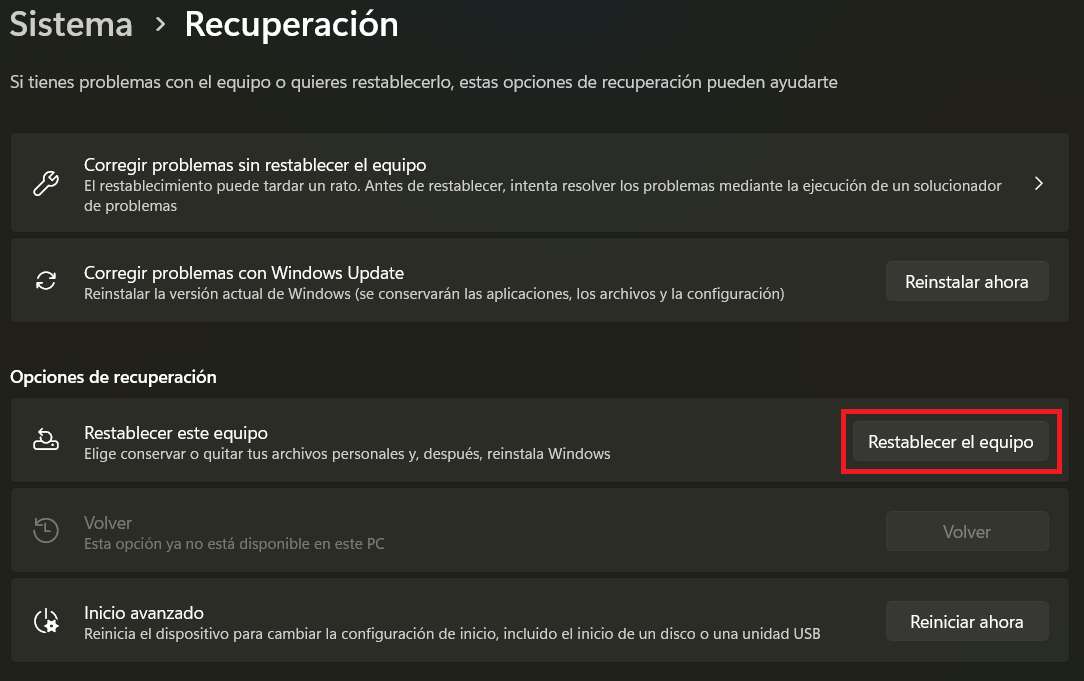
- A new window will appear, select “Remove everything“.

- Now select “Local reinstall“. Important note: This option may not appear during the restoration process if your version of Windows 11 is old. In that case, see the note at the end of this entry.

- Now select “Change settings“.

- Enable “Yes” in “Do you want to clean the data?” and click Confirm. This option will ensure the deletion of all our data. The process will take several hours to complete.

- Finally, click “Next“.
| Warning:
We must bear in mind that the described process securely deletes ALL information from our machine, so it is advisable to have a backup of our information. |