How to install Adobe Acrobat
In this article, we will see how to install Adobe Acrobat.
Adobe Acrobat is an application developed by Adobe Corporation, designed to view, create, and modify files in PDF format. Below is the process for installing the software from the Adobe.com website.
Detailed Guide
- Go to the Adobe website: https://acrobat.adobe.com/es/es/

- Click on Sign In.
- Enter your corporate email, and the following window will appear where you will enter your details and click Accept.
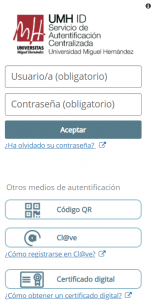 The Two-Factor Authentication window will appear where you will enter the code you just received.
- Once you have logged in with your corporate email, open the Get Apps menu.

- When the menu expands, click the Download Adobe Acrobat Pro button.

- The installer download will begin. Once downloaded, double-click it.
- The following window will open, click Continue.

- The installation process will begin and will take a few minutes. Once the installation is complete, the program will be ready to use.
